

Create a ledger
To create a ledger, go to Accounting and click Create ledger.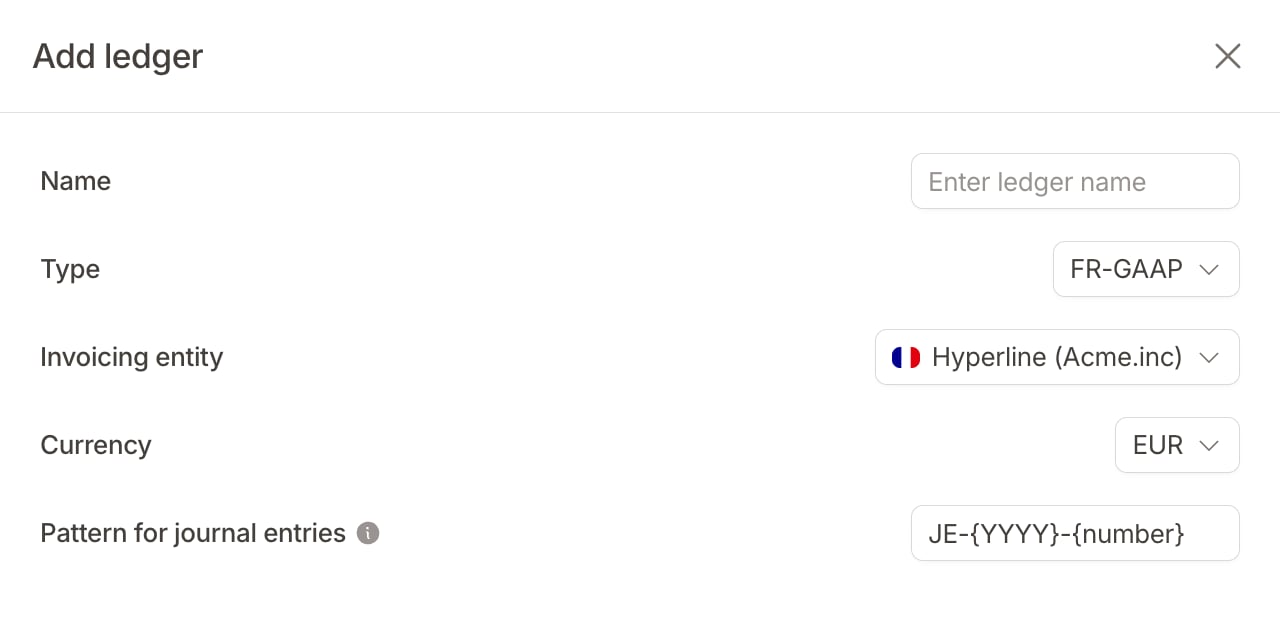
- Name: a label to identify the ledger (e.g. “Statutory – IFRS”, “Management”)
- Type: the starting chart of accounts and configuration to apply (see ledger types below)
- Invoicing entity: the entity this ledger is attached to
- Currency: the functional currency for this ledger; amounts in other currencies are converted using the exchange rate at invoice time
- Pattern for journal entries: the numbering format for journal entries (e.g.
JE-{YYYY}-{number}). The pattern accepts{number}(required, the sequential counter),{YYYY},{MM}, and{DD}
A new ledger starts empty: it posts nothing for billing activity that happened before it was created. See Getting started for how to have past periods replayed into it.
Ledger types
Hyperline supports the following ledger types, each pre-configured with a matching chart of accounts:
Each ledger maintains its own chart of accounts, rules, and journal entry sequence independently.
Edit a ledger
Accounting > Settings opens with a read-only Configuration block summarizing the current ledger. Click Edit there to change its name or journal entry pattern. You can’t change the type, invoicing entity, or currency once you create the ledger.Delete a ledger
To delete a ledger, open Accounting > Settings, open the command menu, and click Delete ledger. Deleting a ledger permanently removes its accounts, rules, and journal entries.You can’t delete the primary ledger.