Concept
Connected seats are an improvement over the existing seat product. Instead of manually entering the number of units when initiating a subscription, Hyperline fetches this data directly from your database. This is especially useful if:- You want your billing system to reflect any changes made to your product (e.g. a user adds a new license)
- You want to keep track of which seat was added or removed, and when
- You want to bill prorated amounts (e.g. a customer starts with 5 licenses but adds another one mid-year)
Practical application
How to create an automated seat-based product?
1
Create a seat-based product
Navigate to the Products section.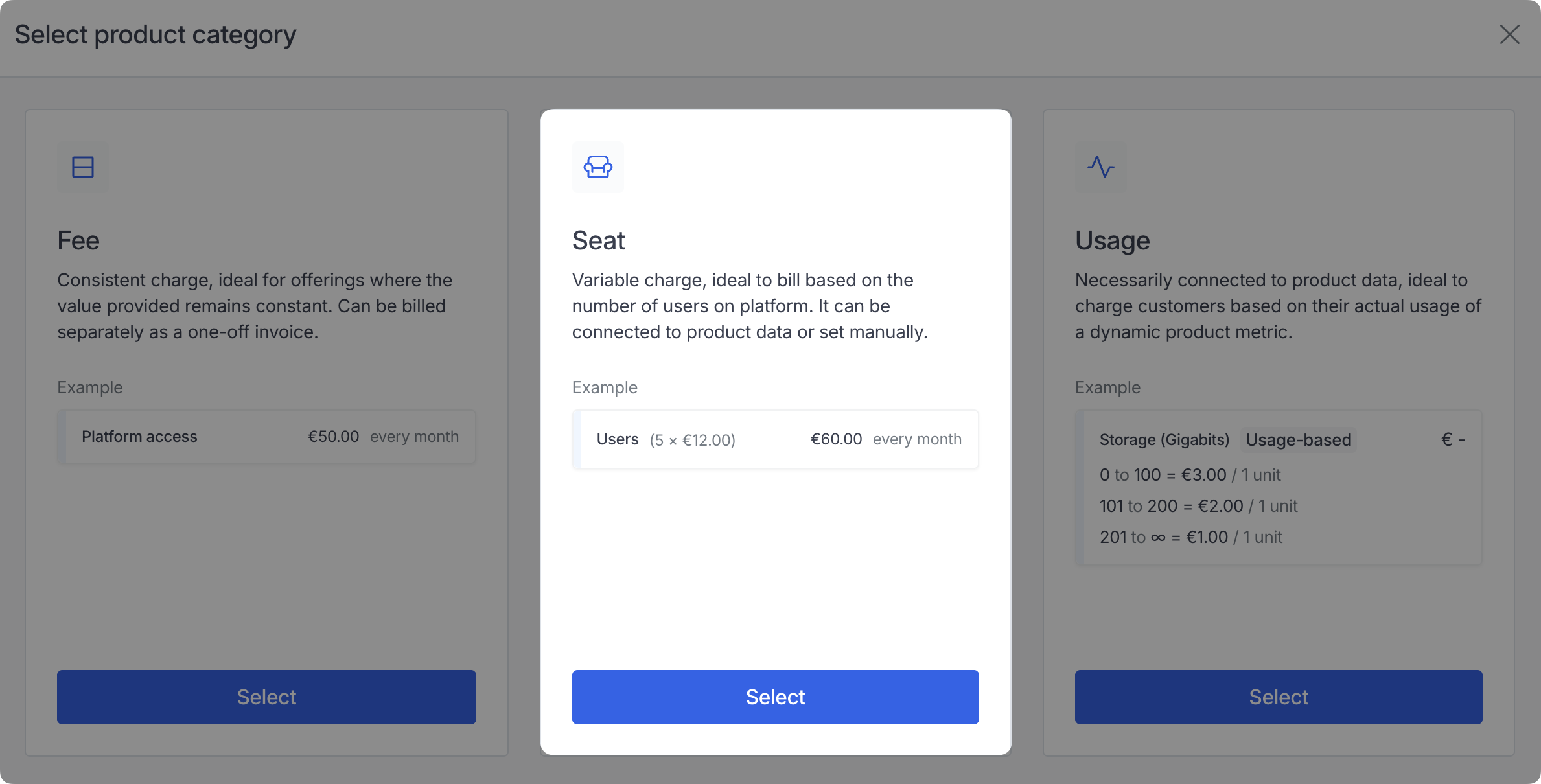
2
Link an aggregator
Select an existing count aggregator to track your seats. The aggregator determines which events are counted and how incoming data is factored into billing calculations.If you haven’t created one yet, head to Usage > Aggregators to set one up first.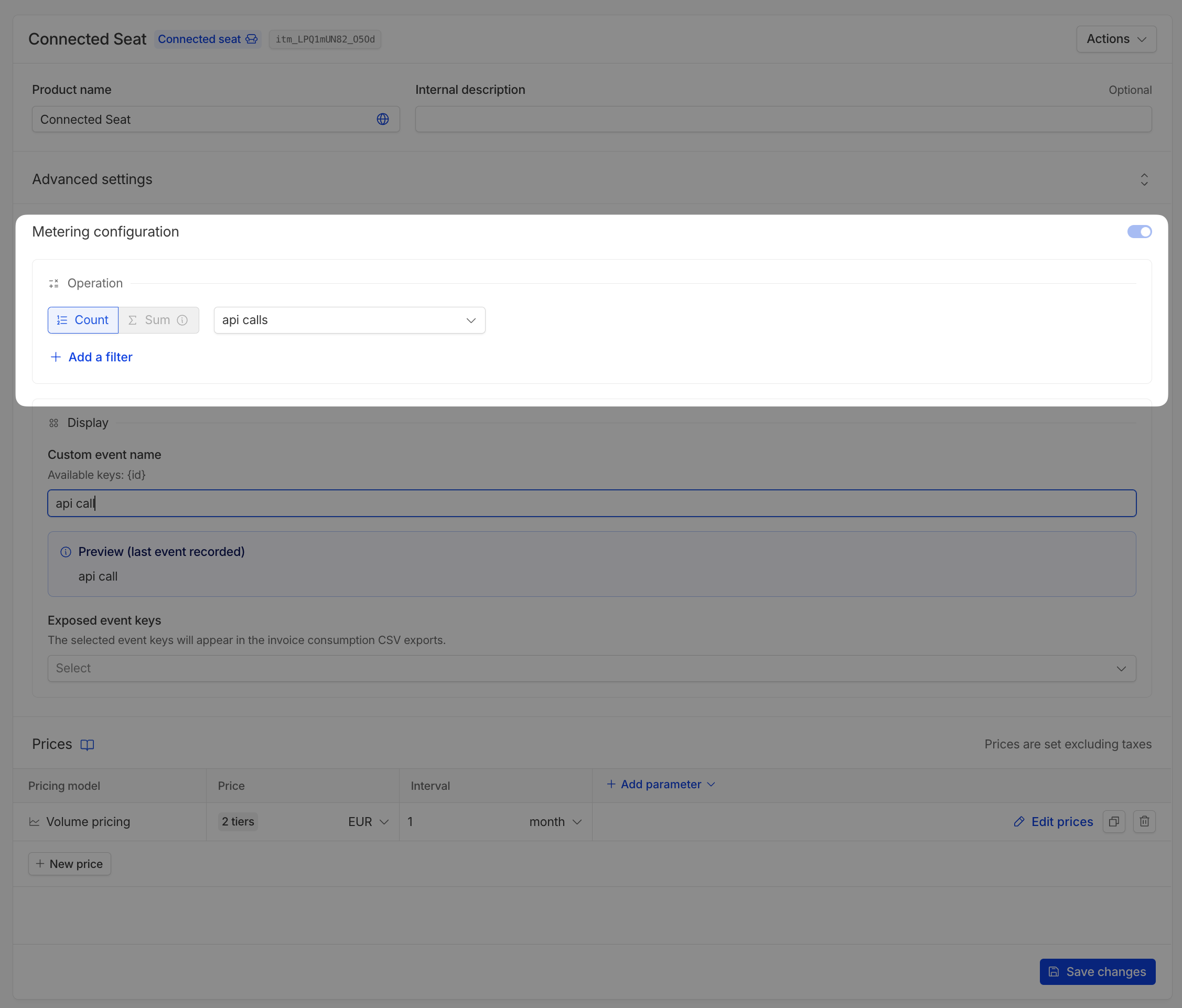
3
Click Create product
That’s it! Your seat-based product should now be marked as “Connected seat”.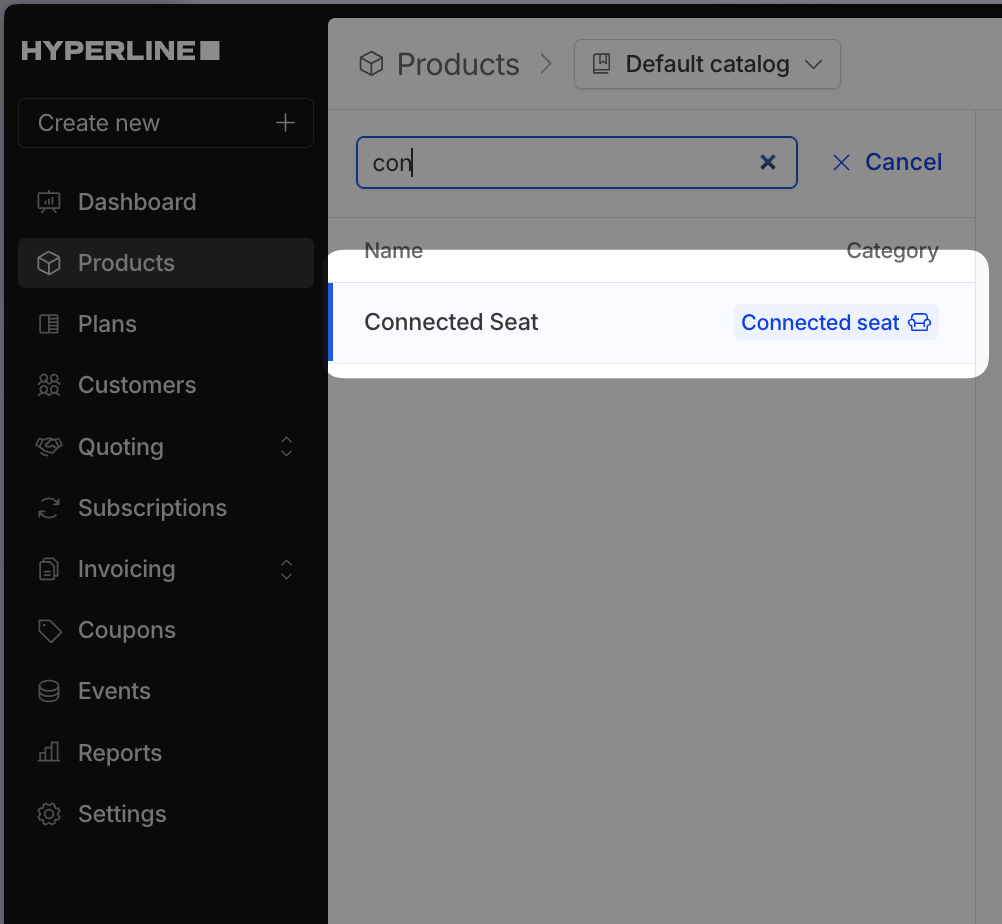
How to configure a connected seats product in subscriptions?
There are four configuration parameters: Refresh schedule, Charging method, Invoicing schedule, and Seat change policy.Refresh schedule
- Realtime: The
countupdates immediately when a change is detected, instantly if you’re using the API, or based on the dataloader interval if you’re using loaders. - Periodic: The
countrefreshes based on the interval you enter in the Refresh interval field. It’s independent of the subscription billing interval but can be matched to it. - Manual: You must trigger the refresh using the endpoint for a more customized experience.
Charging method
Determines how Hyperline bills seat changes it detects during the period.- Do not charge: Track seat counts without generating charges.
- Prorata: Charge proportionally based on when the change occurred in the period.
- Full amount: Charge the full period price regardless of when the change occurred.
Invoicing schedule
Controls when Hyperline generates invoices after it detects seat changes.This setting is only available when the charging method is not set to “Do not charge”.
- Immediately: Hyperline charges (or refunds) the update as soon as it detects it, even in the middle of the period. If selected alongside the “periodic” option, it will simply invoice the customer at every “end” of period.
- With next invoice: Hyperline adds the update amounts to the next invoice as additional lines. For example, the update may be realtime while invoicing happens at the end of the month. In that case, Hyperline updates the subscription count in realtime and adds the charge to the next invoice.
- Custom: Lets you set an invoicing period. For instance, use it if you have an annual subscription you want to update in realtime but want to charge every month.
Seat change policy
Determines how increases or decreases in seat count affect billing during the period.This setting is only available when the charging method is not set to “Do not charge”.
- Standard: No special handling for seat changes during the period.
- Charge highest: Always bill based on the highest seat count detected during the period. Useful to always commit the maximum number of seats.
- Refund decrease: Issue a refund when the seat count decreases. Instructs Hyperline to count negative updates as refunds if they’ve already been paid.
Managing seat decreases
When a seat is removed (e.g., a user is deleted or a license is revoked), you need to signal this change to Hyperline. Since the API is append-only, you don’t delete events directly. Instead, you update them with a flag and configure the aggregator to filter them out. Using anactive or archived (or what you want) boolean:
Use a boolean flag to mark the seat as inactive:
- For a boolean field: add a filter where
archivedequalsfalse
Billing calculation examples
Understanding how Hyperline calculates billing adjustments when seat counts change is essential for predicting your invoices. This section walks through concrete examples using a base price of 10€ per seat with a monthly subscription running from the 1st to the 30th. Those examples do not take into account the settings:Refund when a decrease in unit count is detected and Charge the highest detected value for the period.
End of period billing
When your subscription is configured to bill at the end of the period, Hyperline calculates the final seat count and applies adjustments for any mid-period changes.Pro-rata calculation
Pro-rata calculation
With pro-rata billing, adjustments are calculated proportionally based on when the change occurred during the billing period.Adding seats (60 → 100 seats)You start the month with 60 seats and add 40 seats on the 15th.Removing seats (100 → 60 seats)You start the month with 100 seats and remove 40 seats on the 15th.
The adjustment credits back the 40 seats for the first half of the month when they weren’t in use.
The adjustment charges for the 40 seats that were used during the first half of the month.
Pay in full calculation
Pay in full calculation
With pay in full billing, seat additions are charged at full price regardless of when they were added, while removals still account for usage during the period.Adding seats (60 → 100 seats)You start the month with 60 seats and add 40 seats on the 15th.Removing seats (100 → 60 seats)You start the month with 100 seats and remove 40 seats on the 15th.
New seats are charged at full price for the entire period, regardless of when they were added.
Removed seats are still charged at full price for the period they were active.
Do not charge
Do not charge
When configured to not charge for updates, Hyperline generates no adjustment line items.
- Adding seats: No additional charge (0€)
- Removing seats: No refund or adjustment (0€)
Start of period billing
When your subscription is configured to bill at the start of the period, you pay upfront based on your current seat count. Adjustments for mid-period changes are applied on the following invoice.Pro-rata calculation
Pro-rata calculation
With pro-rata billing, adjustments are calculated proportionally and applied to the next invoice.Adding seats (60 → 100 seats)You start January with 60 seats and add 40 seats on the 15th.Invoice on 1st January (for January period):Removing seats (100 → 60 seats)You start January with 100 seats and remove 40 seats on the 15th.Invoice on 1st January (for January period):
Invoice on 1st February (for February period):
Total for January + February: 1,800€
The February invoice includes the pro-rated charge for the 40 seats added mid-January.
The February invoice includes the pro-rated charge for the 40 seats added mid-January.
Invoice on 1st February (for February period):
Total for January + February: 1,400€
The February invoice includes a credit for the 40 seats removed mid-January.
Pay in full calculation
Pay in full calculation
With pay in full billing, seat changes trigger full-price adjustments on the next invoice.Adding seats (60 → 100 seats)You start January with 60 seats and add 40 seats on the 15th.Invoice on 1st January (for January period):Removing seats (100 → 60 seats)You start January with 100 seats and remove 40 seats on the 15th.Invoice on 1st January (for January period):
Invoice on 1st February (for February period):
Total for January + February: 2,000€
The added seats are charged at full price for the previous period.
Invoice on 1st February (for February period):
Total for January + February: 1,600€
A refund is applied for the removed seats from the previous period.
Do not charge
Do not charge
When configured to not charge for updates, Hyperline generates no adjustment line items.
- Adding seats: No additional charge (0€)
- Removing seats: No refund or adjustment (0€)
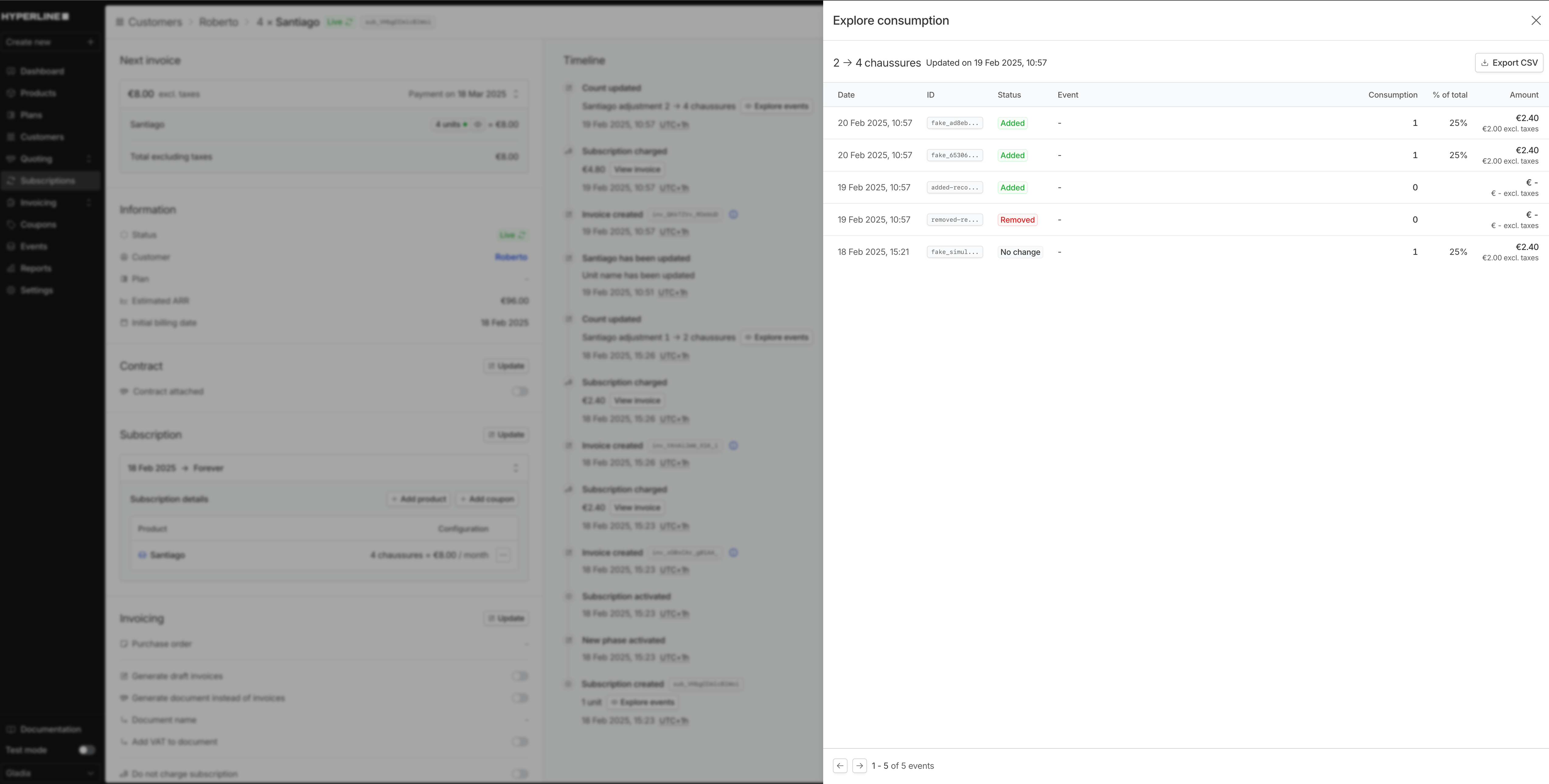
Explore consumption
In the context of connected seats, consumption refers to the usage of the seat-based product. You can review this consumption in the dedicated section within the Hyperline platform. This view provides a comprehensive look at the usage of each seat-based product, allowing for better understanding and management of your billing process. You can also review the consumption of a subscription in the subscription timeline.