> ## Documentation Index
> Fetch the complete documentation index at: https://docs.hyperline.co/llms.txt
> Use this file to discover all available pages before exploring further.
# Aggregators
> Configure aggregators to transform raw events into billable metrics
Aggregators are the bridge between your raw usage events and your billable products. They define **how** event data is transformed into a single metric that drives billing — whether that's counting occurrences or summing a numeric property.
Aggregators are managed independently in **Usage > Aggregators** and can be linked to multiple products.
## Operations
An aggregator uses one of two operations to compute a billable metric from your events:
### Count
Counts the number of matching events. Use this when you bill based on the number of occurrences (e.g., API calls, logins, transactions).
### Sum
Sums the value of a specific numeric property across matching events. Use this when you bill based on a cumulative measure (e.g., data transferred in GB, compute hours consumed).
When using **Sum**, you must specify which event property to aggregate.
## Configuration
When creating an aggregator, you configure the following:
* **Name**: A descriptive label for the aggregator
* **Event type**: The type of event to aggregate (e.g., `api_calls`, `storage`, `users`)
* **Operation**: Count or Sum (and the target property for Sum)
* **Unit name**: The label displayed alongside aggregated values (e.g. `API calls`, `GB`, `seats`). Surfaces on usage charts, prices, invoices, and the customer portal.
* **Filters**: Optional conditions to narrow which events are included. Filters support AND/OR logic with operators like `equals`, `in`, `gte`, `lt`, etc.
* **Exposed event keys**: Event fields to surface in the UI for transparency and debugging
* **Allow negative values**: Whether the aggregated result can go below zero
The unit name is configured on the aggregator itself. It used to live on each product; products linked to an aggregator now inherit its unit name automatically.
### Default aggregation interval
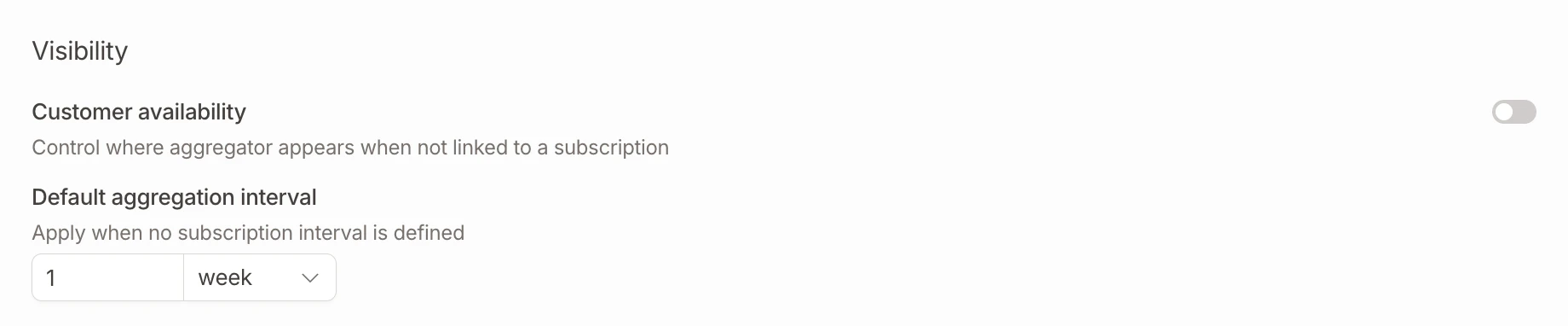
You can set a **default aggregation interval** on an aggregator by specifying a count and a period (days, weeks, months, or years). This default is used as a reference interval when displaying usage data and computing current aggregated values on the [customer Usage tab](./customer-usage).
 ## Aggregator filters
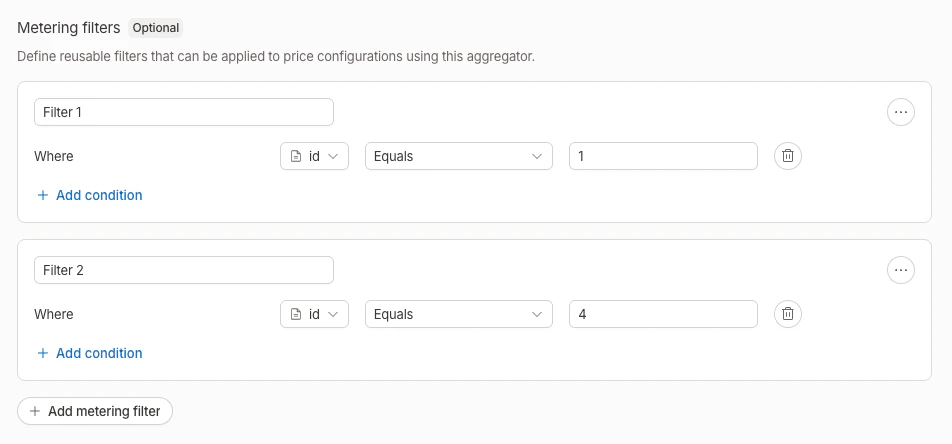
Aggregator filters let you define **named filter sets** on an aggregator. Each filter combines conditions using AND/OR logic on event properties (e.g., `region equals "eu"`, `plan in ["pro", "enterprise"]`).
Filters serve two purposes:
* **Billing**: different prices can apply based on which filter an event matches (see [price metering filters](#price-metering-filters))
* **Usage visualization**: on the [customer Usage tab](./customer-usage), each filter is displayed as a separate line on the usage chart with its own color and legend entry
## Aggregator filters
Aggregator filters let you define **named filter sets** on an aggregator. Each filter combines conditions using AND/OR logic on event properties (e.g., `region equals "eu"`, `plan in ["pro", "enterprise"]`).
Filters serve two purposes:
* **Billing**: different prices can apply based on which filter an event matches (see [price metering filters](#price-metering-filters))
* **Usage visualization**: on the [customer Usage tab](./customer-usage), each filter is displayed as a separate line on the usage chart with its own color and legend entry
 A filter can only be deleted if it is not referenced by any product price.
## Thresholds
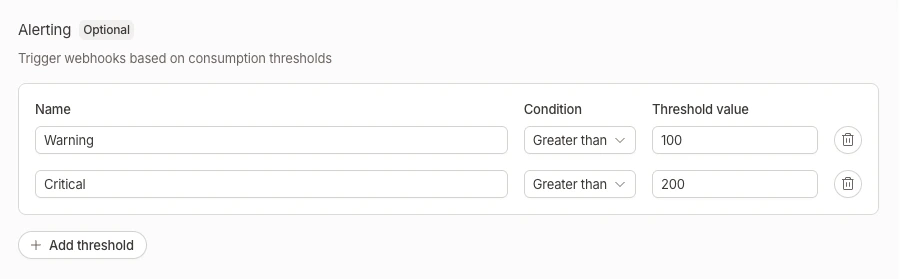
Thresholds let you define **alert conditions** on an aggregator. Each threshold specifies:
* **Name** (optional): A descriptive label for the threshold
* **Operator**: Greater than or equal to (`>=`) or less than or equal to (`<=`)
* **Value**: The numeric threshold value
When a customer's aggregated usage crosses a threshold, Hyperline can notify you via [webhooks](../../api-reference/docs/webhooks) (`aggregator.threshold_crossed` event) or [Slack notifications](../../integrations/slack).
On the [customer Usage tab](./customer-usage), thresholds are displayed as dashed horizontal reference lines on the usage chart, with the operator and value shown as labels.
A filter can only be deleted if it is not referenced by any product price.
## Thresholds
Thresholds let you define **alert conditions** on an aggregator. Each threshold specifies:
* **Name** (optional): A descriptive label for the threshold
* **Operator**: Greater than or equal to (`>=`) or less than or equal to (`<=`)
* **Value**: The numeric threshold value
When a customer's aggregated usage crosses a threshold, Hyperline can notify you via [webhooks](../../api-reference/docs/webhooks) (`aggregator.threshold_crossed` event) or [Slack notifications](../../integrations/slack).
On the [customer Usage tab](./customer-usage), thresholds are displayed as dashed horizontal reference lines on the usage chart, with the operator and value shown as labels.
 ## Which products use aggregators?
Not all product types require an aggregator. Here's when you need one:
| Product type | Aggregator required? | Allowed operations |
| ------------------ | -------------------- | ------------------ |
| **Fee** | No | — |
| **Seat** | No | — |
| **Connected seat** | Yes | Count only |
| **Usage** | Yes | Count, Sum |
| **Credit** | Yes | Count, Sum |
A seat product becomes a [connected seat](/docs/subscriptions/connected-seats) product when an aggregator is selected.
## Managing aggregators
Navigate to **Usage > Aggregators** to create, edit, and delete aggregators.
### Create an aggregator
Click **New aggregator**, configure the operation, event type, and optional filters, then save.
### Edit an aggregator
Click on an existing aggregator to update its configuration. The detail page also shows which products are currently linked to this aggregator.
### Delete an aggregator
An aggregator can only be deleted if no products are linked to it.
## Linking an aggregator to a product
When creating or editing a usage-based, credit, or connected seat product, you select an existing aggregator from a dropdown instead of configuring metering inline.
* **Usage products**: select any aggregator (count or sum)
* **Credit products**: select any aggregator (count or sum)
* **Seat products**: select a count aggregator (only when connected seats are enabled)
For more details on product configuration, see [Products and prices](/docs/products/overview).
## Price metering filters
For usage-based products, you can further refine billing by adding **metering filters at the price level**. This allows different prices for the same product based on specific event properties (e.g., region, instance type).
Learn more in the [usage-based product documentation](/docs/products/overview#metering-configuration).
## Which products use aggregators?
Not all product types require an aggregator. Here's when you need one:
| Product type | Aggregator required? | Allowed operations |
| ------------------ | -------------------- | ------------------ |
| **Fee** | No | — |
| **Seat** | No | — |
| **Connected seat** | Yes | Count only |
| **Usage** | Yes | Count, Sum |
| **Credit** | Yes | Count, Sum |
A seat product becomes a [connected seat](/docs/subscriptions/connected-seats) product when an aggregator is selected.
## Managing aggregators
Navigate to **Usage > Aggregators** to create, edit, and delete aggregators.
### Create an aggregator
Click **New aggregator**, configure the operation, event type, and optional filters, then save.
### Edit an aggregator
Click on an existing aggregator to update its configuration. The detail page also shows which products are currently linked to this aggregator.
### Delete an aggregator
An aggregator can only be deleted if no products are linked to it.
## Linking an aggregator to a product
When creating or editing a usage-based, credit, or connected seat product, you select an existing aggregator from a dropdown instead of configuring metering inline.
* **Usage products**: select any aggregator (count or sum)
* **Credit products**: select any aggregator (count or sum)
* **Seat products**: select a count aggregator (only when connected seats are enabled)
For more details on product configuration, see [Products and prices](/docs/products/overview).
## Price metering filters
For usage-based products, you can further refine billing by adding **metering filters at the price level**. This allows different prices for the same product based on specific event properties (e.g., region, instance type).
Learn more in the [usage-based product documentation](/docs/products/overview#metering-configuration).