> ## Documentation Index
> Fetch the complete documentation index at: https://docs.hyperline.co/llms.txt
> Use this file to discover all available pages before exploring further.
# Payment methods
> Learn about supported payment methods
Hyperline supports out of the box a variety of payment methods, giving you the flexibility to propose different options to your customers.
The available payment methods on your account mainly depend on your country of incorporation and your connected Payment Service Provider (PSP).
* **Credit & Debit cards**: Visa, Mastercard and American Express
* **Direct Debit**:
* **SEPA** Direct Debit for customers in the Single Euro Payments area
* **ACH** Direct Debit (for customers with a bank account in the US & in USD)
* **Bacs** Direct Debit (for customers with a bank account in the UK & in Pounds)
* **Bank transfers**: direct bank transfers from your customers to your bank account
* **Apple Pay** and **Google Pay**
On your **Settings** -> **Payment**, you can connect the PSP you want to use and select the payment methods you want to enable on your account.
## Payment Service Provider
Hyperline natively supports major Payment Service Providers (PSPs). This means that using these services won't require any technical work from you, and your PSP account will be fully orchestrated by Hyperline without extra work on your side.
| PSP | Supported payment methods |
| ---------- | ---------------------------------------------------------------- |
| Stripe | Card, SEPA Direct Debit, ACH Direct Debit, Apple Pay, Google Pay |
| Mollie | Card, SEPA Direct Debit, SEPA Transfer |
| GoCardless | SEPA Direct Debit, Bacs Direct Debit, ACH Direct Debit |
| Airwallex | Card, SEPA Direct Debit, Bacs Direct Debit, ACH Direct Debit |
| Adyen | Card, SEPA Direct Debit, Bacs Direct Debit |
### Configure Apple Pay and Google Pay
To use Apple Pay and Google Pay, you must first enable them and register specific web domains in your payment service provider (PSP) account. These payment methods require domain verification in order to function properly when embedded in web pages.
To complete this step, register the domain `hyperline.co` in your PSP account. If you've configured a custom domain on Hyperline for your hosted pages, you must register that domain as well.
More details in the [Stripe documentation](https://stripe.com/docs/apple-pay/web#register-your-domain).
## Customer payment methods
Hyperline gives you **fine-grained control over which payment methods are available to each customer**. This allows you to tailor the payment experience and **restrict certain methods** based on customer-specific needs or preferences.
The enabled payment methods are displayed to the customer on their [**portal page**](../customers/portal) or when using [**embedded components**](../../api-reference/docs/react-components).
You can configure this in two ways:
* Via the **Settings** modal under the **Payment Methods** section on the customer's page.
* While assigning a subscription to a customer, by selecting the allowed payment methods for the customer.
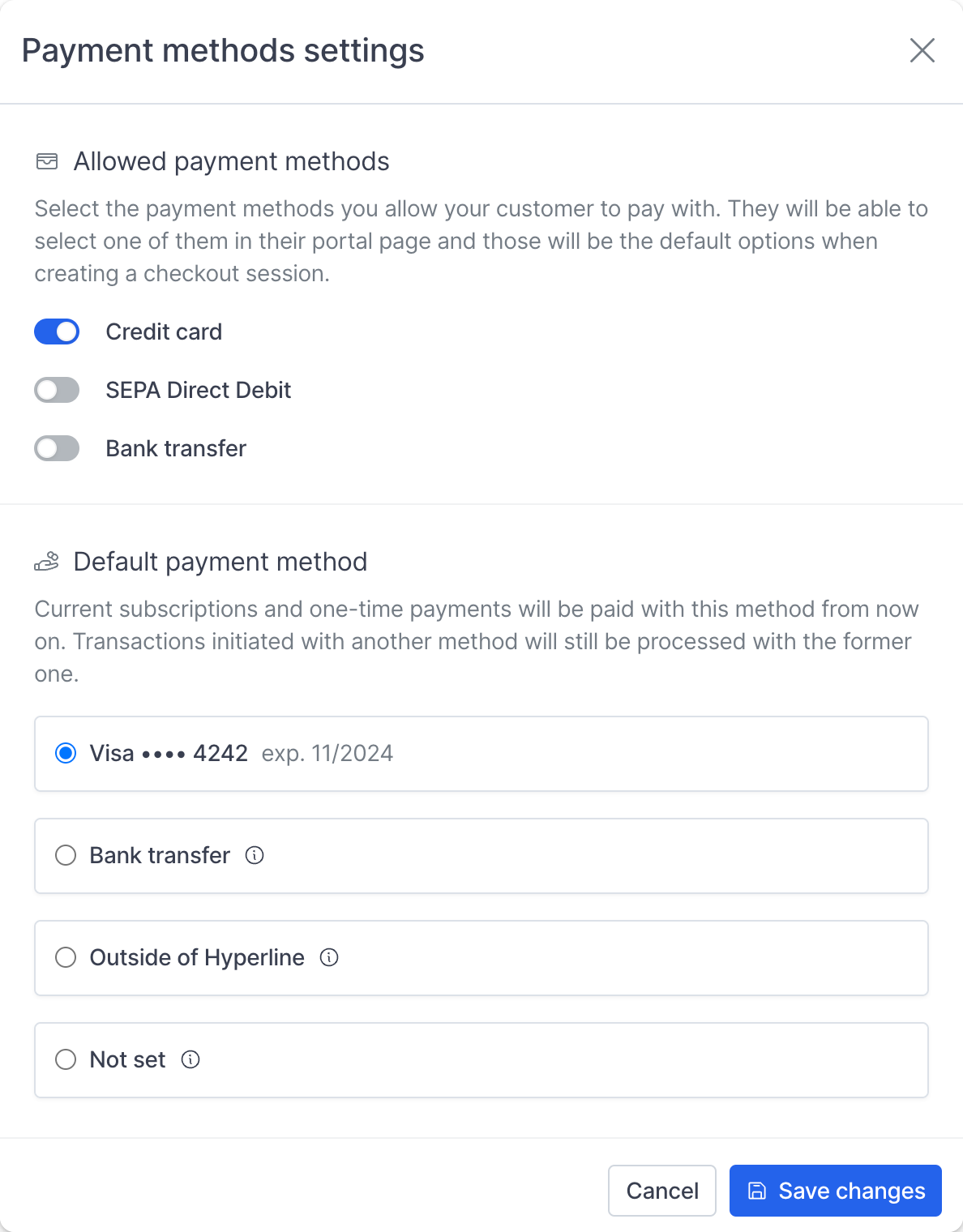 You can optionally configure a **default payment method** for each customer—choosing between a saved payment method, **bank transfer**, or **Outside of Hyperline**.
If no default is set, Hyperline will automatically use the **first payment method** provided by the customer.
## Manage payments outside of Hyperline
If you prefer not to use Hyperline's built-in payment capabilities, you can manage payments **entirely outside of the system**. This is particularly useful if you already operate a complex banking infrastructure or act as your own payment processor.
In this case, there's no need to connect a payment service provider (PSP). You can configure the customer's payment method as **"Outside of Hyperline"**, which:
* Disables all payment-related logic in billing flows
* Removes payment method sections from the **hosted pages** (checkout, quote, invoice) and **customer portal**
This approach gives you full control over payment collection while still benefiting from Hyperline's billing and subscription management features.
You can optionally configure a **default payment method** for each customer—choosing between a saved payment method, **bank transfer**, or **Outside of Hyperline**.
If no default is set, Hyperline will automatically use the **first payment method** provided by the customer.
## Manage payments outside of Hyperline
If you prefer not to use Hyperline's built-in payment capabilities, you can manage payments **entirely outside of the system**. This is particularly useful if you already operate a complex banking infrastructure or act as your own payment processor.
In this case, there's no need to connect a payment service provider (PSP). You can configure the customer's payment method as **"Outside of Hyperline"**, which:
* Disables all payment-related logic in billing flows
* Removes payment method sections from the **hosted pages** (checkout, quote, invoice) and **customer portal**
This approach gives you full control over payment collection while still benefiting from Hyperline's billing and subscription management features.